
Can multiple users be added to a US standard smart lock? This is a question that many potential buyers of smart locks often ask. As a supplier of US standard smart locks, I'm here to provide you with a comprehensive answer to this query.
Understanding US Standard Smart Locks
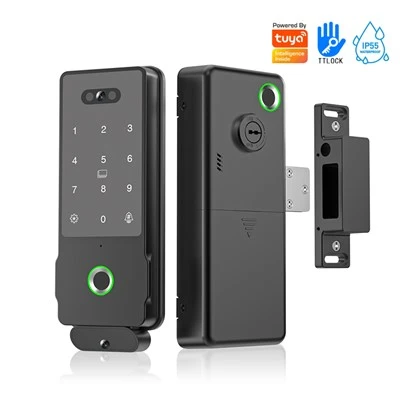
US standard smart locks are designed to meet the specific security and installation requirements in the United States. These locks come in various types, including Biometric Face ID Smart Lock, Deadbolt Smart Lock, Face ID Smart Door Locks, and Handle Intelligent Lock. Each type offers unique features and functions, but they all share the common goal of enhancing home security through smart technology.
The Ability to Add Multiple Users
One of the key advantages of US standard smart locks is their capability to add multiple users. This feature is particularly useful for households with multiple family members, rental properties, or commercial buildings. Whether you have children, tenants, or employees, you can easily add them to the smart lock system.


How It Works
Most US standard smart locks come with a companion mobile app or a web - based interface. Through this platform, you can manage user accounts. You can add new users by entering their details, such as name and contact information. For locks with biometric features like face ID or fingerprint recognition, you'll need to have the new user enroll their biometric data. This process usually involves capturing their face or fingerprint multiple times from different angles to ensure accurate recognition.
If the lock uses access codes, you can generate unique codes for each user. These codes can be set to have specific access times, for example, a tenant might have access only during certain hours of the day. You can also revoke access at any time. If a user no longer needs access, such as a tenant moving out, you can simply delete their account from the system.
Benefits of Adding Multiple Users
- Enhanced Security: By having unique access for each user, you can easily track who enters and leaves the premises. If there is any security breach, you can quickly identify which user was involved.
- Convenience: Each user can access the property in their preferred way, whether it's through a code, biometric data, or a mobile app.
- Flexibility: You can customize access rights for different users. For example, you can give employees limited access to certain areas of a commercial building.
Considerations When Adding Users
While adding multiple users to a US standard smart lock is generally straightforward, there are a few considerations to keep in mind.
System Capacity
Some smart locks have a limit on the number of users they can support. Before purchasing a lock, it's important to check the specifications to ensure it can accommodate the number of users you need. For large commercial buildings or multi - family homes, you might need a lock with a high user capacity.
Security Risks
As the number of users increases, so does the potential for security risks. For example, if a user's access code is shared or compromised, it could lead to unauthorized entry. To mitigate these risks, it's important to educate users about security best practices, such as not sharing access codes and keeping their biometric data private.
Compatibility
Ensure that the smart lock is compatible with the devices your users will be using. Most smart locks are compatible with both iOS and Android devices, but it's still a good idea to double - check.
Real - World Applications
Residential Use
In a family home, parents can add their children to the smart lock system. They can set different access times for school days and weekends. For example, children can be given access to the house after school, but the lock can be set to restrict access during late - night hours.
Rental Properties
Landlords can add tenants to the smart lock system. This eliminates the need for physical keys, which can be lost or copied. When a tenant moves out, the landlord can quickly revoke their access.
Commercial Buildings
Business owners can add employees to the smart lock system. They can give different levels of access to different employees based on their job roles. For example, a manager might have access to all areas of the building, while a regular employee might only have access to the office area.
Conclusion
In conclusion, US standard smart locks can indeed have multiple users added to them. This feature offers numerous benefits in terms of security, convenience, and flexibility. As a supplier of US standard smart locks, we understand the importance of providing a reliable and user - friendly solution. Our Biometric Face ID Smart Lock, Deadbolt Smart Lock, Face ID Smart Door Locks, and Handle Intelligent Lock are designed to meet the diverse needs of our customers.
If you're interested in purchasing US standard smart locks for your home, rental property, or commercial building, we invite you to contact us for a detailed discussion about your requirements. Our team of experts is ready to assist you in finding the perfect smart lock solution.
References
- Smart Lock Industry Reports
- Manufacturer's Product Specifications
- User Reviews and Testimonials